Built for real estate teams
Stop wrestling with
commission accounting
From closing statement to journal entry in seconds. Upload the PDF. Dealsplit reads the splits, computes what the office actually kept, and writes the balanced entry for your books.
Watch one number take itself apart
Agents, splits, and concessions are different every deal. Dealsplit gets you the numbers that matter.
AI Extraction proposes each figure. Nothing posts until you approve it.
Clear arithmetic on every deal. Every figure comes straight from your commission statements and lets you understand your numbers today and at year-end.
415 LARKSPUR ST NW
Washington, DC 20011 · closed Dec 18 · KWCP Needs reviewWho got paid
Two buyer-side agents, one concessionWe do everything by the deal, just like you. Every item and split is clear to see, especially the important one, your profit.
Debits
What the office spent and holdsAgent A · x-Leadership:Team A 9,080.00
Agent B · x-Leadership:Team A 1,000.00
Office expense 1,680.00
Net to office 5,535.00
Credits
What the office earnedKWCP · x-Leadership:Team A 16,800.00
KWCP · x-Leadership:Team A 495.00
Dealsplit writes entries your accountant will be proud of, each tied back to your statements.
| Status | Property | Close | GCI | Splits | Expenses | Net to office |
|---|---|---|---|---|---|---|
| Posted | 1708 MULBERRY STREET NE | Dec 30, 2025 | $34,695.00 | $20,400.00 | $0.00 | $14,295.00 |
| Needs review | 415 LARKSPUR ST NW | Dec 18, 2025 | $17,295.00 | $10,080.00 | $1,680.00 | $5,535.00 |
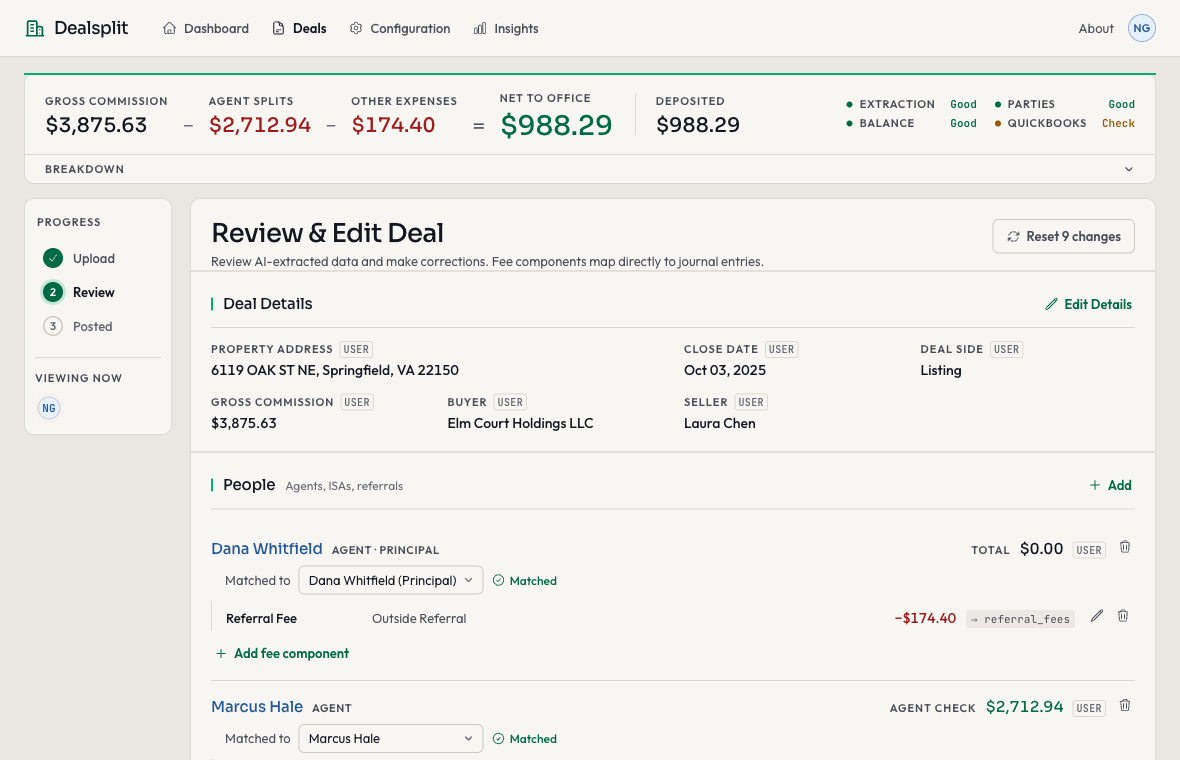
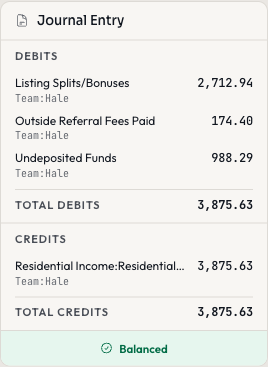
| Posted | 6119 OAK ST NE | Oct 03, 2025 | $3,875.63 | $2,712.94 | $174.40 | $988.29 |
| Posted | 511 BAYBERRY TERRACE | Sep 08, 2025 | $11,120.00 | $6,375.00 | $0.00 | $4,745.00 |
four closings, one column you can add up
Each deal is a row in your book, with the numbers that matter rolled up by the month, the quarter, or the year.
Stay on top of the numbers that matter most to you. They aren't on your closing statements, but they're easy to see in Dealsplit.
From the playbook of
AgentCFOAgentCFO runs the books for real estate teams. The chart of accounts, where a concession goes, the line between an agent's split and an office expense — Dealsplit took all of it from their practice instead of inventing it.
What sits between the PDF and your books
Extraction, arithmetic, double-entry and posting — the parts of a closing that should not depend on somebody being careful at six in the evening.
It reads the statement
Upload a closing statement. Dealsplit pulls every figure off it — gross commission, every split, vendor lines, concessions. Whatever brokerage it came from, whatever shape the form is in.
The numbers move together
Change one split and the equation, the journal entry and the checks all resettle at once. No formula to drag down a column, nothing to add up a second time to see whether it still agrees.
Double-entry, not a summary
Balanced debits and credits, real account numbers, a dimensional tag on every line. Your accountant can tie any line back to the statement without asking you what it means.
Written from the office's side
The commission comes in to the office, and the office pays everyone out of it. An agent's split is an expense, the principal's commission stays put, and a concession comes out of your own pocket. Book those three the same way and the margin you report is fiction.
Statements that file themselves
Point Dealsplit at the Drive folder your closings already land in. It picks up each new statement, reads it and queues it for review before anyone thinks to open it.
Insights and reporting
Pipeline value, revenue recognized, and what is still sitting in review. One dashboard, current as of the last closing you approved.
From closing to books in three steps
You upload the statement and you approve the result. Everything between those two is the machine's problem.
Upload
Drag the closing statement in. Dealsplit reads it and lays the deal out the way your books need it.
Drop your PDF here
AI extracts deal data in seconds
Review
Check the figures against the statement, and fix anything the extraction read wrong. Nothing posts until you say so.
Post
Approve it, and the entry goes to QuickBooks or Sheets with its debits, credits and tags already attached. That closing is done.
Pricing
Every plan handles a closing the same way. You are only picking how many a month, and where the entries go.
Light
For individual agents
- 3 deals per month
- Google Sheets posting
- Email support
Pro
Most popularFor growing teams
- 20 deals per month
- QBO & Sheets posting
- Priority support
Elite
For high-volume offices
- 200 deals per month
- QBO & Sheets posting
- Insights dashboard
- White glove setup and QBO integration
- Dedicated support
Two closings free, no card required. Pro works out to about three dollars a closing. Change plans or cancel whenever.
Manage your clients' books?
Accountants and bookkeepers run every client agency from one login. Statements in, journal entries out, one bill.
Start with the closing already on your desk
Upload it, see what comes back, and decide then.
2 free deals · No credit card required · Upgrade anytime